Run AI Simulations Inside Your Meetings
Culture Circuit integrates directly into Google Meet™ as a native add-on. Launch real-time organizational culture simulations, get AI-powered coaching, and analyze team dynamics — all without leaving your meeting.
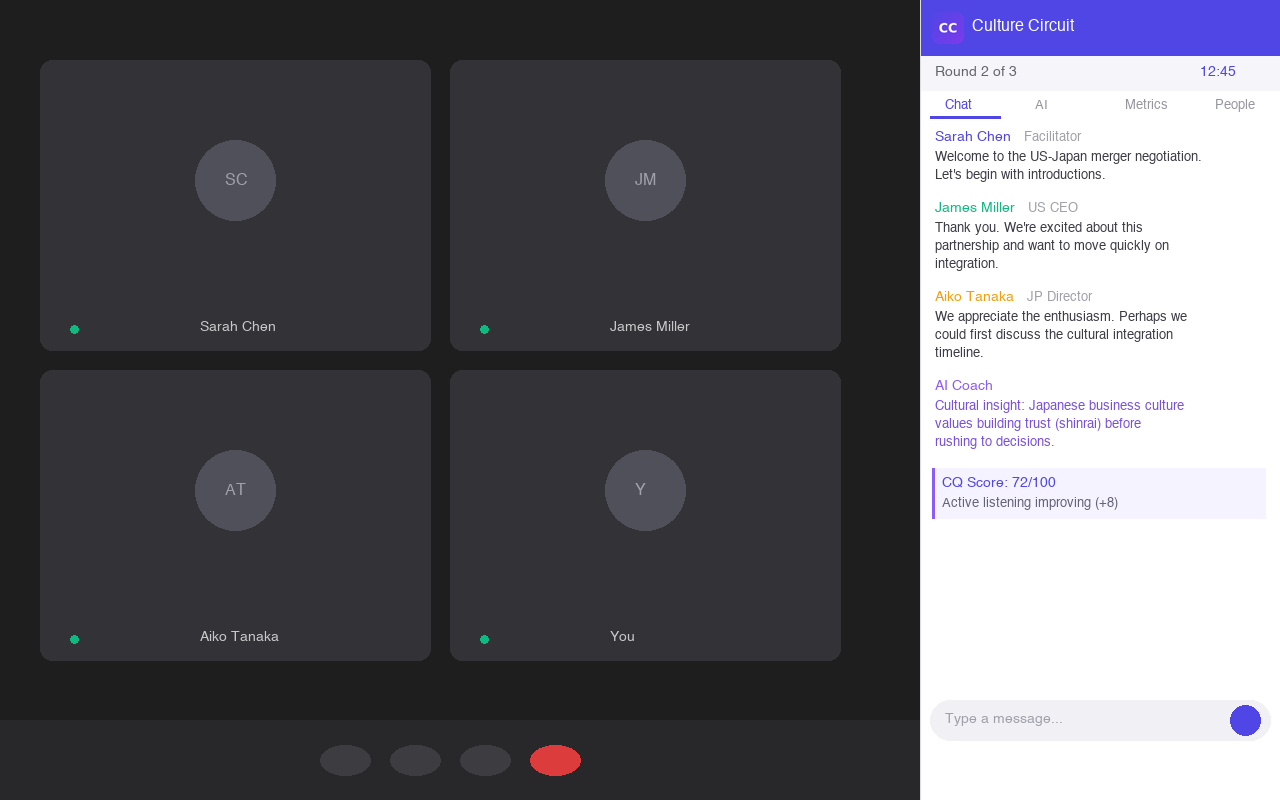
Key Features
Everything You Need, Right Inside Meet
No tab-switching. No separate apps. Culture Circuit brings the full simulation experience into your Google Meet™ call.
Real-Time Simulations
Launch multi-round crisis simulations directly from the Meet side panel. All participants join and interact in real time.
Voice Mode & Metrics
Enable voice mode to track speaking time, turn-taking balance, and participation equity. See who dominates and who's silent.
AI Coaching Agents
12 specialized AI coaches give private, real-time feedback. Negotiate better, communicate more clearly, manage conflict.
Live Chat & Discussion
Unified chat timeline with quote-reply, message reactions, and AI feedback dots. All messages are logged for post-simulation analysis.
Analytics & Reports
Get CQ scores, social network analysis, topic heatmaps, round-by-round breakdowns, and exportable PDF reports — all on the main stage.
Enterprise-Grade Security
TLS 1.3 encryption, isolated org data, SOC 2 aligned practices. Your simulation data never leaves our secure infrastructure.
Important Things to Note
- Browser: The add-on works in Google Chrome on desktop. Other browsers are not officially supported.
- Incognito mode: The add-on does not work in Incognito/Private browsing windows.
- Account required: All participants need a Culture Circuit account. Free sign-up is available from the side panel.
- Any participant can open: Any meeting participant can open the Culture Circuit add-on; only the facilitator can start and control the simulation.
- No audio/video access: Culture Circuit runs in an isolated iframe and never accesses your Google Meet™ audio or video streams.
Step by Step
How to Set Up Culture Circuit in Google Meet™
Get up and running in under 2 minutes.
Open Activities in Google Meet™
During a Google Meet™ call, click the "Activities" icon (the shapes icon) in the bottom-right toolbar. This opens the add-ons panel.
Select Culture Circuit
Find "Culture Circuit" in the list of installed add-ons and click to open it. The Culture Circuit side panel will appear on the right side of your meeting.
Sign In & Pick a Simulation
Sign in with your Culture Circuit account (or sign up for free). Then browse available simulations, pick roles, and configure your session — all from the side panel.
Start the Simulation
The facilitator clicks "Start" and the simulation launches for all participants. The main stage opens automatically with the full simulation dashboard, chat, AI coaches, and analytics.
Collaborate & Get AI Feedback
Participants chat, discuss, and strategize in real time. AI coaches provide private feedback, voice metrics track speaking balance, and the Cultural Intelligence score updates live.
Review Reports & Analytics
When the simulation ends, a comprehensive report is generated with CQ scores, communication network analysis, topic heatmaps, and AI-powered insights — all visible on the main stage.
Two Views, One Experience
Side Panel & Main Stage
Side Panel
The side panel opens on the right side of your Google Meet™ window (~360px wide). Use it to:
- Sign in and browse simulations
- Chat with team members and AI coaches
- Control simulation flow (facilitators)
- Access the built-in help center
Main Stage
The main stage occupies the full meeting screen (replaces the video grid). Use it for:
- Full simulation dashboard with two-column layout
- Voice metrics visualization & speaking balance
- Real-time analytics and CQ score tracking
- Post-simulation reports with network graphs
FAQ
Frequently Asked Questions
Ready to Transform Your Meetings?
Install Culture Circuit from the Google Workspace Marketplace™ and start running AI-powered simulations in your next Google Meet™ call.